
In recent years, our team has heard of multiple situations where money has been stolen from my client’s personal checking or savings accounts. Our team has been wrapping our heads around why and how it happens, and I want to share some of what we’ve learned.
Let me start with how these things actually happen, because the mechanics are less mysterious than they sound. Then I will give you a short list of what to do about it.
Here is the one that worries me most, called a SIM port, or SIM swap. Your phone number does not live inside your phone. It lives with your carrier, and it can be moved to a different phone. A scammer collects a few pieces of information about you, often from an old data breach or a convincing email, then calls your cell provider pretending to be you and says they got a new phone. If successful, your service on your current phone drops, and the scammer will receive texts and phone calls you were supposed to receive. That matters because so many of us use text messages to receive security codes. Once they control your number, they go to your bank, click "forgot password," and the reset code gets texted straight to them. Now they are inside.
From there, the goal is always to get money out. The good news is that the last mile is genuinely hard. Moving money to a new outside account, what we call a third-party wire, sets off a wall of verification: text codes, phone calls, verbal authorization, waiting periods. We send legitimate wires for clients all the time, and even those take real effort. However, funds inside a checking account can be accessed via cashier's checks and other digital apps, making them a more frequent target for fraud.
Here is the short list of what I’m personally doing for my own accounts.
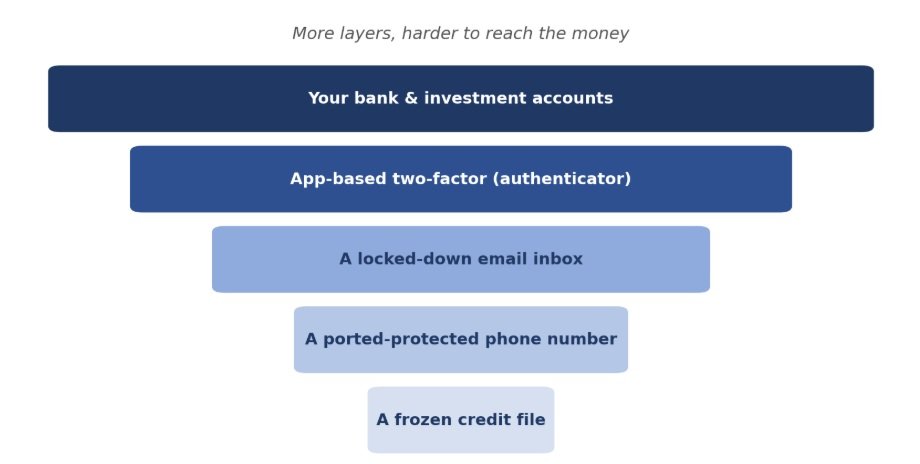
1) Switch from text codes to an authenticator app for your banks, investments, and email. An app like Google Authenticator or Microsoft Authenticator generates the code right on your device, so it never travels over your phone number where a SIM port could grab it. On each important account, look under the security settings for "two-factor" or "authentication app" and follow the prompts to scan a code. If this is set up, a thief would need your physical phone along with your login information to access your accounts.
2) Call your cell carrier and lock your number against porting. Every major carrier now offers a free port-out PIN or number-lock feature. Ask them to add a port freeze and a separate PIN required for any account changes. It takes one phone call, and it is the single best defense against the whole SIM-swap problem.
3) Lock down your email. Almost every password reset in your life runs through your inbox. If someone owns your email, they can walk into everything else. Use a long, unique password and turn on the authenticator app there too. Most email services also let you log out of every device at once. If you ever suspect something is off, do that first, then change the password.
4) Fourth, freeze your credit. This is free, and it stops someone from opening new loans or cards in your name. You do it once at each of the three bureaus, Equifax, Experian, and TransUnion, and you can thaw it temporarily whenever you actually need to apply for something.
I also want to share some drawbacks to the authenticator apps since I am recommending them. The biggest one is that if you lose or replace your phone without a backup, you can lock yourself out of your own accounts, which is its own kind of headache. When you set one up, save the backup or recovery codes it offers, and either use an app that backs up to the cloud or keep those codes somewhere safe.
No single lock is perfect, but stacked together they are very effective. Here is roughly how they fit:
If reading this made you realize a few of these are still on your to-do list, you are in good company. Most people, including myself, have waited to make these changes. But they are easy fixes.
As always, if you want to walk through any of this together, feel free to reach out.
Happy Planning,
Alex
This blog post is not advice. Please read disclaimers.