The Recent Birthday Party Invite Scam
You open your email inbox and see a cheerful email from a friend inviting you to a birthday party. It's an email directly from your friend, and it seems they are using one of the many internet invitation websites (Evite, Punchbowl, etc). So you click to open the invitation.
This is one of the more effective scams circulating right now, and it's landing in inboxes because it doesn't look like a scam. It looks like a party invitation. Security researchers flagged a sharp increase in these attacks through late 2025, and they're still going. I’ve personally heard from multiple people who have fallen for this because the email looks so legitimate.
Normally, scam emails are filtered into your junk folder by your email provider when they notice the same generic email being sent to hundreds or thousands of people. However, the email providers train their spam filters to trust these platforms because those services legitimately send millions of invitations every day. Scammers exploit that trust by using a look-alike email that appears to come directly from a trusted contact. The result is a phishing email that arrives right alongside your real mail.
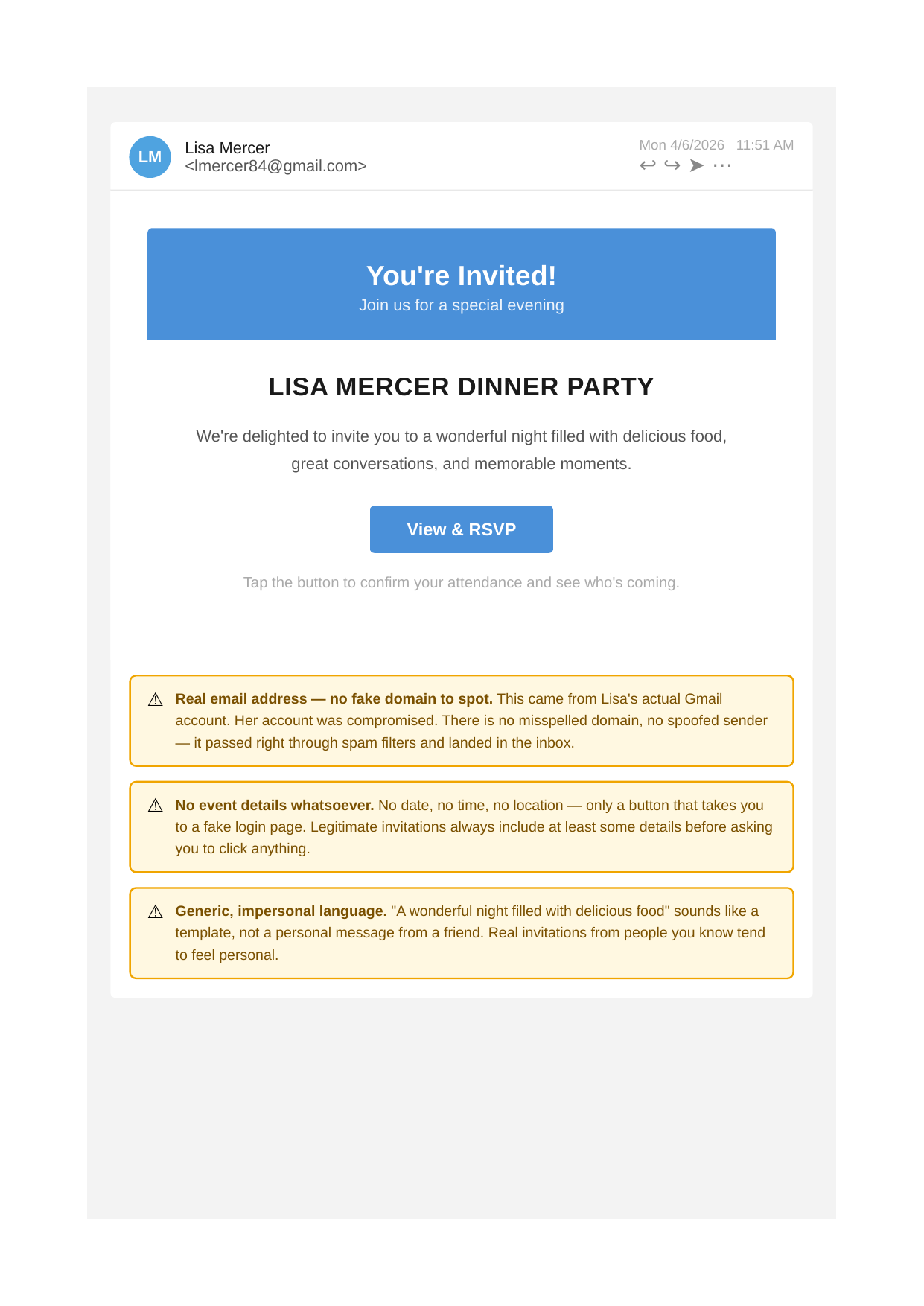
In this email, the invitation came from “Lisa's” actual Gmail address. Not a spoofed version. And that changes everything, because the one thing most people are told to check (the sender's email address) comes back clean.
How They Get In
Usually, it starts with a phishing link just like this one. Someone in Lisa's contacts clicked a fake invitation, entered their credentials on a convincing login page, and handed those over to the attacker. The hacker then sent the same email to all contacts, including Lisa, who clicked it herself. Likely, several of the emails Lisa sends out will get opened, so it just continues.
Once someone has your email password, they start working quickly. The first thing attackers typically do is quietly harvest your contacts and sent mail. Then they send the same scam invitation to everyone you know, using your real account, your real name, and your real history with those people.
What They're Actually After
Once they are in your email, they can use them to reset passwords on financial accounts, brokerage accounts, and anywhere else that sends a "forgot my password" link to your inbox. They can read years of statements and messages to piece together a detailed picture of your finances. And they can do all of this quietly, before you even know anything is wrong.
What To Look Out For
With a real sender address, you lose the most obvious red flag. But the content itself still gives things away. There are usually very few details in the email. Just a button to RSVP. Legitimate invitations from people you know include at least some details. The language also tends to feel generic, not a personal note from a friend.
If a party invitation from someone you know feels off, text or call that person directly before you click anything.
What to Do If Your Own Account Gets Compromised
If you ever find out that something like this went out from your email address, move fast. Change your password immediately and enable two-factor authentication if you haven't already. Go through your account's recent login activity and sign out any sessions you don't recognize. Then let your contacts know, directly, so they don't click anything that came from you in the last day or two. Most email providers, like Gmail, have tools that let you send mass emails to all your contacts.
After that, it's worth reviewing your financial accounts to verify that no password resets or new logins occurred. The window between when an attacker gets in and when they're caught is often where the real damage happens.
Be safe!
Alex
This blog post is not advice. Please read disclaimers.